For arlanix/product-feed 1.0
Mapping
The mapping is the table in the feed form that says, for every field the channel wants, where its value comes from. One row is one field. This page explains each column and the three ways to fill a row.
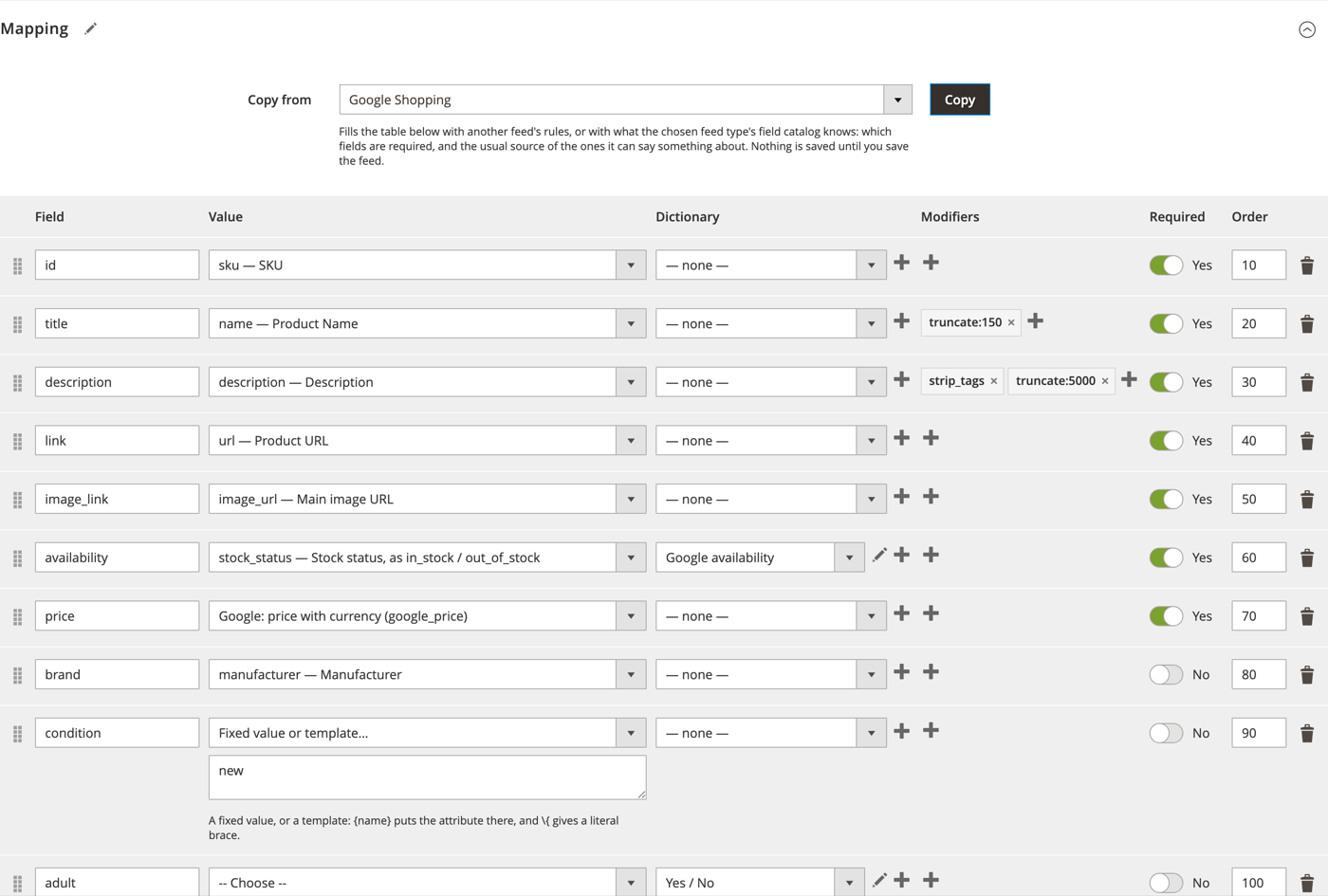
The columns
| Column | What it is |
|---|---|
| Field | The name of the field in the channel's file: id, title, price. For a feed of type Google Shopping the names must be Google's; for Generic any name goes and becomes a column in the file. |
| Value | The source of the value. The picker lists product attributes, computed values and Fixed value or template…; see below. |
| Dictionary | A translation table applied after the value is read: see Dictionaries. |
| Modifiers | Small changes made to the value on its way out: cut it, strip HTML, change case. See Modifiers. |
| Required | A product with nothing in this field is left out of the feed, and Run History counts it. The copy from a field catalog ticks it for the fields the platform insists on; untick it to send the product with the field empty and let the platform decide. |
| Order | The order of the columns in the file. Rows can also be dragged by the handle at the left. |
The × at the right of a row removes it. Add field adds an empty row at the bottom.
Three kinds of source
Open the Value picker on any row. It has three groups.
Attributes
A value straight off the product: sku, name, description, color, any attribute the catalogue has. A select or multiselect attribute gives its option label, not its id. parent.sku and the other parent.… entries read the configurable parent of a product, which is what item_group_id needs.
Computed
Values the module works out rather than reads:
- Product URL: the product's own page, its parent's, or the parent's with this child's options pre-selected. GET parameters can be appended, for tracking:
utm_source=google&utm_content={sku}. - Image URL and Additional image URLs: the main image, or the rest of the gallery, at a size the theme declares.
- Price with currency, Sale price with currency, Sale window: prices the way every shopping platform wants them written,
34.00 USD, with the sale price only while a special price is in force and the window of the special price in ISO 8601. - Google product category: from the Google categories section of the feed. Category path: the product's own deepest Magento category, as
Women > Tops > Blouses.
A computed source may show an argument under the picker, such as the image size: choose one.
Fixed value or template
Choose Fixed value or template… and a text box appears. Whatever you type goes out as it is, for every product: new for condition, GB for a country. Curly braces put an attribute into the text:
{name} in {color}, size {size}
gives Joust Duffle Bag in Blue, size L. \{ gives a literal brace.
Modifiers
A modifier changes the value after it is read and before it is written. Press + on a row to pick one from the list; it appears as a chip, and several chips run left to right. A chip with an argument is written name:argument.
| Modifier | Does |
|---|---|
strip_tags |
Removes HTML, leaving the text. The copied description row has it. |
truncate:150 |
Cuts to a length, on a word boundary. Google allows 150 characters in a title and 5,000 in a description. |
trim |
Removes spaces from both ends. |
lower, upper, ucfirst |
Lower case, upper case, first letter capitalised. |
prefix:text, suffix:text |
Puts text in front of, or after, the value. |
replace:from:to |
Replaces one piece of text with another. |
default:text |
Uses this text when the value is empty. |
number:2 |
Formats as a number with that many decimals. |
date:Y-m-d |
Formats a date, PHP date() syntax. |
A name the module does not know is marked in the table and refuses the save, naming the row.
Dictionaries
A dictionary translates a store's values into a channel's. The store says Navy, Google wants Blue; the store's stock status is 1, Google wants in_stock. Dictionaries live under Arlanix → Dictionaries, so one dictionary serves any number of feeds and rows.
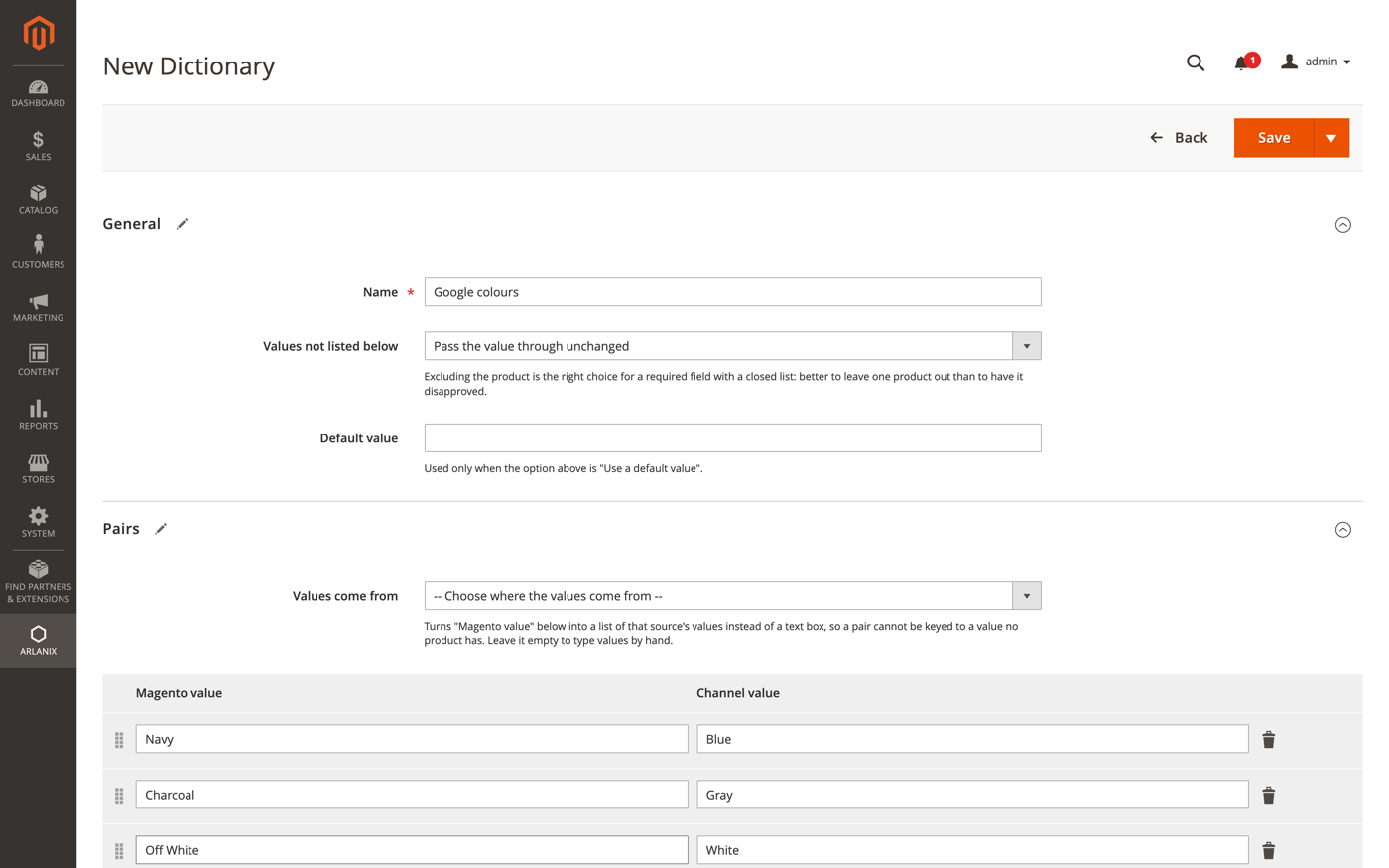
- Name: your own name for it.
- Values not listed below: what to do with a value the pairs do not mention. Pass the value through unchanged is right for colours. Exclude the product from the feed is right for a required field with a closed list of allowed values, such as
age_group: better one product less than a disapproved one. The other two are Leave the field empty and Use a default value. - Values come from: pick the attribute the values are read from, and the Magento value column becomes a list of that attribute's options, so a pair cannot be keyed to a value no product has. Leave it empty to type values by hand.
- Pairs: Magento value on the left, Channel value on the right. Add pair adds a row.
On a mapping row, choose the dictionary in the Dictionary column. The pencil next to it opens that dictionary for editing without leaving the feed, and the + makes a new one. The copy from the Google Shopping catalog already attaches the dictionaries Google's closed lists need: availability, age group, gender, adult.
Copy from
Copy from fills the table in one go, from another feed or from a field catalog, and asks first when the table already has rows: Replace mine throws your rows away, Update mine keeps rows for fields you already have and adds the rest, Cancel leaves everything as it is. Nothing is saved until the feed is saved.
What the feed type expects
The feed's Type knows the platform's fields: which of them it requires, how long a text may be, which values a field accepts. That knowledge fills the table when you copy the type's catalog, and after that it only warns; it never leaves a product out and never refuses a save. The platform has the last word on its own rules, and the module's copy of them can be older than the platform.
| Where | What it says |
|---|---|
| Above the form, every time a saved feed opens | A yellow message naming the fields the type requires that have no mapping row, for example No mapping rule for Price, which the feed type requires. Add the row, or leave it out knowingly. |
| Run History, in a run's Details | How many products went out with an empty field the type requires, a text over its length or a value the type does not list: one line per field, with the number of products. |
| Preview, under a row | The same, for the products on screen, marked Warning. |
A product is left out of the feed by the mapping alone: a field marked Required that it has nothing for, or a dictionary set to exclude it. Run History counts those too, by field, and Preview marks the row Left out.
Checking a row
Save the feed and press Preview at the top. It shows the rows of a few products exactly as they will go out, after dictionaries and modifiers, so a wrong source or a missing dictionary is visible before the file is published, and names under each row what the feed type would have otherwise. See running and checking.